Yes! Amazon Lockers aren’t solely designed for Amazon packages. Shipping agencies like FedEx, UPS, and USPS are permitted to utilize Amazon Lockers to deliver packages. Besides, some companies have special lockers that are equivalent to an Amazon Locker, and they work with UPS, FedEx, USPS, and Amazon Prime packages.
Key Takeaways
- Amazon Lockers are “self-service kiosks” that you can use to pick up your Amazon packages for no extra fee
- Amazon will send you a six-digit code for your Locker as soon as your order has been delivered
- If you are an Amazon Prime subscriber then you will receive the package in two days
- The best part of Amazon Lockers is that you can easily pick up your packages even on weekends
How Amazon Lockers Work?
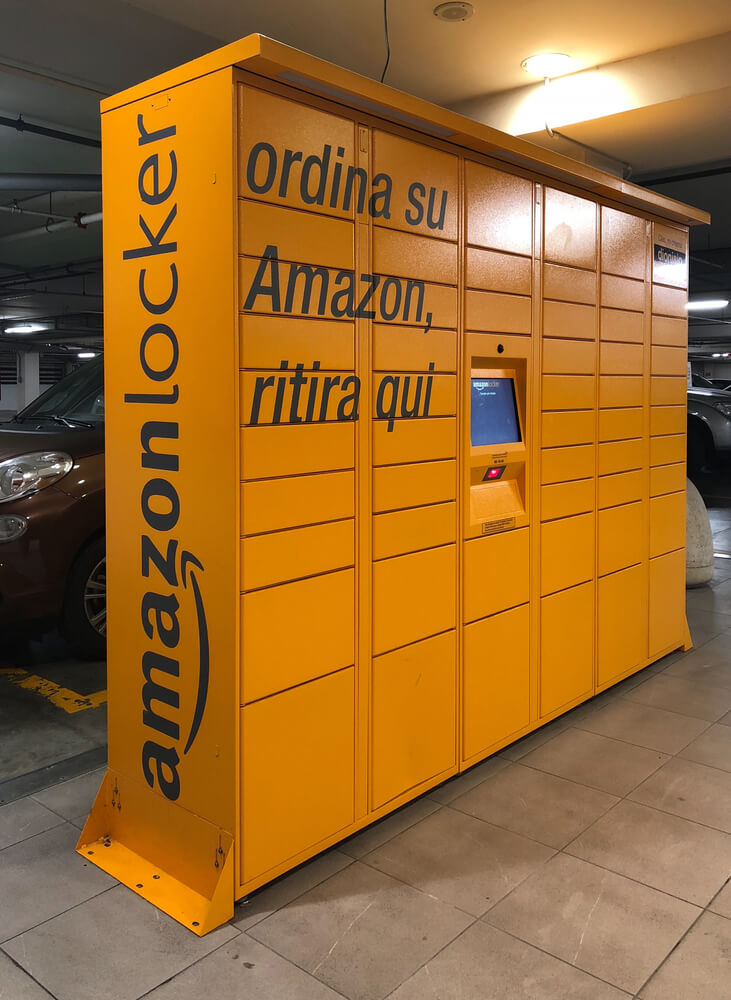
As a potential customer, add the location of your neighborhood Amazon Locker to your shipping addresses before completing an order on Amazon. To do this, go to the Account page, and in the Ordering and shopping preferences section, click Your addresses. Amazon will send you a six-digit code for your Locker as soon as your order has been delivered. Then, enter the code on the Locker’s screen and a door will pop open when you go to your Locker. All customers are given three days to get their items from the locker. If after three days, the items will be taken back and customers will be refunded. However, that’s not the case with Amazon Prime subscribers. They will receive their packages in two days. But that is not to say that you have to be a member of Amazon Prime to use Amazon Locker.
How and When To Use An Amazon Locker
If you have a Locker in your neighborhood, then you can open an Amazon account and make use of Amazon Locker. The store hours of the location where the Amazon Locker in your neighborhood is determines the access to the locker. You’ll be able to access the Amazon Locker at Whole Foods according to the opening and closing time of the store. One of the things we love about Amazon Lockers is that you can easily pick up your packages even on weekends.
Amazon Lockers vs. Amazon Hubs
Amazon Hubs are available only in apartment complexes which makes them different from Amazon Locker. You need to contact your building’s management company to find out if your apartment hosts its own Amazon Hub. Amazon Lockers, on the other hand, are available in grocery stores, gas stations, convenience stores, postal centers, and more, and you can always pick up your packages at your convenience.
Steps Involved In Setting Up An Amazon Locker or Hub
Locate a Prime drop location around you and include it in your list of delivery addresses if you want a future delivery sent to Amazon Locker or a hub at your apartment complex. That’s not to say you must choose a location that’s closely located to your home. Some customers even prefer locations closer to where they work. The good thing is that customers can add a number of different locker locations.
Follow the following steps to find Amazon Locker and Hub locations, and add them to your address.
Step 1: Log in to your Amazon account and go to Account & Lists > Account.
Step 2: Scroll down and select Your addresses.
Step 3: Select Add Address.
Step 4: Under Add a new address, select Or find an Amazon pickup location near you
Step 5: Scroll down to the Hub or Locker you’d like to add and select Add to address book. The new locker emerges in your list of saved addresses
Amazon Locker Limitations and Requirements
When using Amazon Locker and Amazon Hub, you need to be aware of certain things. The good thing about these lockers and hubs is that there are widespread. A customer will easily find one near his or her apartment. Just check the map and you’ll be able to locate the nearest Amazon Locker. Besides, there are some requirements that you need to meet up with. For instance, when you’re making an order for packages that will be picked up at a locker, then it must:
1. Not contain items shipping from other countries
2. Not contain items for Release-Date Delivery
3. Be valued at less than $5,000
4. Contain no hazardous materials
5. Not be a Subscribe & Save item
6. Weigh less than 20 lbs.
7. Be smaller than 19 x 12 x 14 inches
8. Be sold or fulfilled by Amazon.com
Regarding the returns, cost, and delivery, you need to abide by the following rules and regulations.
1. The Amazon Locker appears grayed out on the Amazon Location map if it’s location is full. You might not be able to ship there during checkout.
2. Standard shipping and free shipping may be unavailable at some Amazon Locker locations even though there is no fee for using an Amazon Locker.
3. Your items will be in their own locker. No one else’s items will be in that locker.
4. One-Day Shipping and Same-Day Delivery are only available in select areas.
5. You can return an item to an Amazon Locker location. Besides, as you print the return slip, the code you need to open the locker becomes available.
FAQs
After extensive research, we’ve made a curative list of frequently asked questions and answers on Amazon Locker for packages outside Amazon. Let’s check it out!
Can You Return Items To Amazon Locker?
Can Amazon Locker Be Used For Non-Amazon Packages?
Can FedEx Use Amazon Locker?
Can You Ship To An Amazon Locker Without Prime?
Can You Use Amazon Locker For Non-Amazon Packages The UK?
Can You Use Amazon Locker For Purchases Outside Of Amazon?
Conclusion
Amazon basically used the lockers as a loss-leader to get more customers into their company. The good thing here is that customers will be able to pick up their packages at the time that suits them without having to worry about porch pirates. We’ve come to the end of this informative piece. We hope it was resourceful in your quest to know whether there’s anything like Amazon Locker for packages outside of Amazon.
References:
https://www.geekwire.com/2017/amazons-new-hub-delivery-lockers-will-accept-packages-sender/
https://www.amazon.com/gp/help/customer/display.html?nodeId=201910770